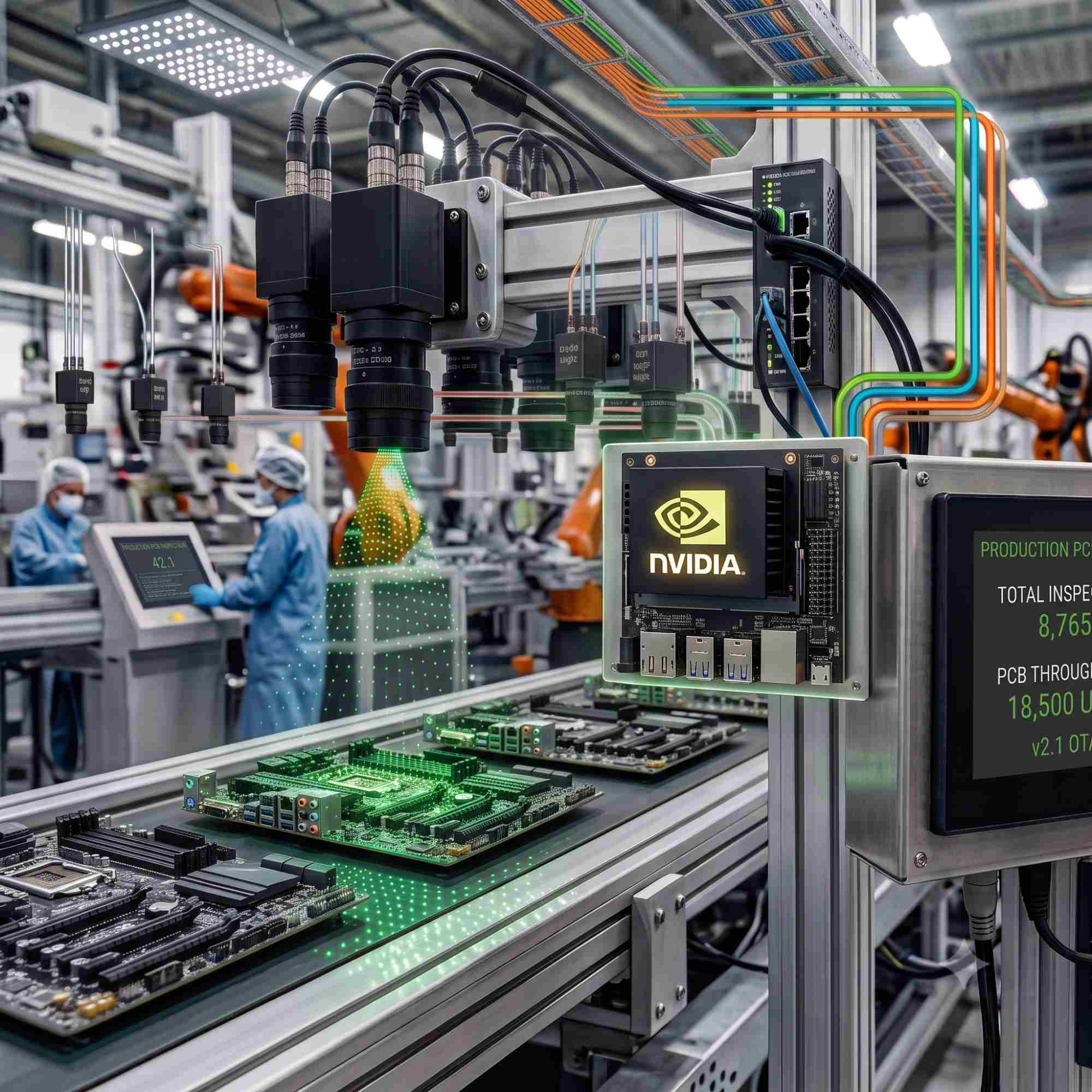
On a quick-production line, the parts are being inspected at a speed that leaves no space for a slow feedback loop. That could be, depending on the line, tens of thousands of units per hour. At that rate, one badly aligned part can turn into a shipped defect in seconds.
Surface defects can go unnoticed through the system as well. That’s where edge AI industrial inspection shines. It detects flaws where the parts themselves are moving.
Almost every computer vision project on a factory floor goes through the same phase where someone asks why not just stream the inspection feeds to the cloud and run the heavy models there. If you’ve ever plugged a real industrial camera into a plant network, you already know the answer. A handful of 4K streams will choke a typical facility uplink in minutes, and the moment latency spikes or the link drops, the inspection line goes blind and defective units slip downline before anyone notices.
So inference has to run at the edge, right next to the line. We built an edge AI platform and deployed it on the NVIDIA Jetson Nano Developer Kit. Our system performs inference on the device itself, right at the production line. In this post, we’ll talk through the architecture of our edge AI industrial inspection platform, our training and curation loop, and how we provision edge nodes.
Why Edge AI Industrial Inspection Needs Its Own Architecture
We deliberately avoided a single monolithic Python script. An infinite while True OpenCV loop sitting in a sealed metal box next to hot equipment is a recipe for memory leaks, GIL stalls, and dropped frames. Instead, we split the work across small, single-purpose services coordinated with Docker Compose:
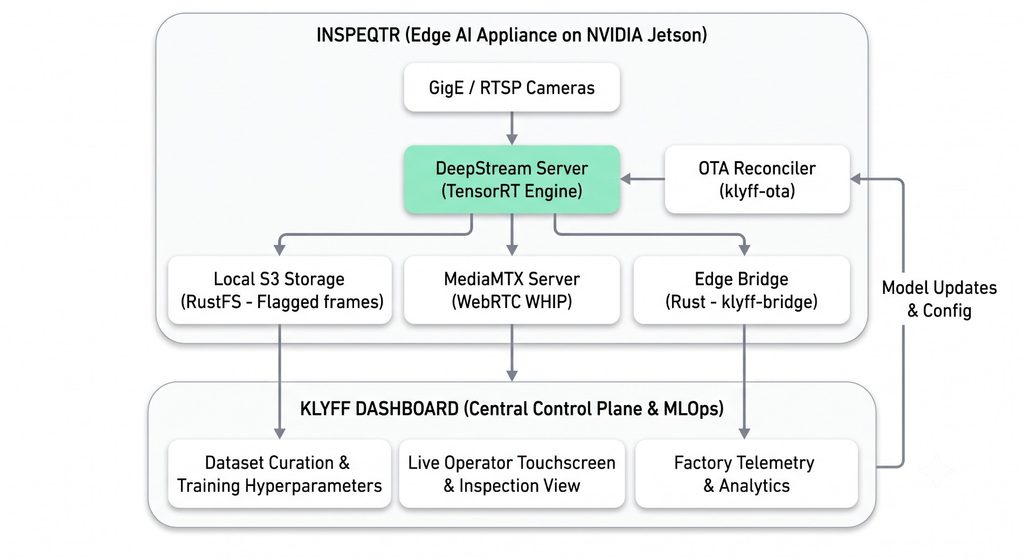
A quick rundown of who does what:
The DeepStream pipeline server decodes incoming H.264 in hardware, runs the detection model directly in unified GPU memory, and draws bounding boxes on the fly. MediaMTX takes the annotated video from DeepStream over WebRTC WHIP and serves it to operator touchscreens in under 400ms. Our Rust edge bridge listens to local MQTT for detection events, pulls the flagged frames, writes them to local S3 storage, and pushes telemetry to the Klyff platform the plant already runs. An OTA reconciler pulls new model weights, compiles them on-device, validates them, and hot-swaps the running engine without stopping the line.
Hardware Auto-Discovery for Mixed Fleets
Real plants are not homogeneous. One line might be a Jetson Nano, another an Intel box. Hardcoding platform assumptions is a quick way to break a deployment when maintenance swaps hardware.
One trap worth calling out: checking command -v nvidia-smi alone is not enough. On Jetson Tegra boards, nvidia-smi is often missing or stripped down entirely. Our bootstrap script checks the actual hardware buses instead:
has_nvidia() {
    (command -v nvidia-smi >/dev/null && nvidia-smi -L >/dev/null 2>&1) ||
        (command -v lspci >/dev/null && lspci | grep -qi nvidia) ||
        [[ -f /etc/nv_tegra_release ]] || grep -qi "tegra" /proc/cpuinfo 2>/dev/null
}
When it finds an NVIDIA processor, it writes out the environment file:
COMPOSE_PROFILES=nvidia
INFERENCE_ENGINE=deepstream
INFERENCE_ENGINE_URL=http://localhost:8088
PIPELINE_SERVER_CONTAINER_NAME=deepstream-server
MANAGED_CONTAINER_SERVICES=deepstream-server,edge-bridge,mqtt-broker
That one check is what keeps an NVIDIA node from trying to start the Intel OpenVINO containers, or the reverse.
Inference: DeepStream and TensorRT
We train a YOLO-based detection model on whatever defect or anomaly classes matter for the product on that line: missing features, surface defects, alignment errors, that kind of thing. But shipping a compiled model to the edge isn’t as simple as copying a file over. TensorRT engines don’t travel across GPU architectures. An engine built for an Ampere RTX 4090 will crash immediately on a Jetson Xavier NX or a Nano, because the cache layouts and core counts don’t match.
So we ship portable ONNX artifacts from the MLflow registry, and each device compiles its own engine locally the first time it boots:
#!/usr/bin/env bash
ONNX_MODEL="/models/active_model.onnx"
ENGINE_MODEL="/models/active_model.engine"

if [ ! -f "$ENGINE_MODEL" ]; then
    echo "Compiling TensorRT engine locally on Jetson GPU..."
    /usr/src/tensorrt/bin/trtexec \
        --onnx="$ONNX_MODEL" \
        --saveEngine="$ENGINE_MODEL" \
        --fp16 \
        --workspace=2048
fi
On the inference side, we call CUDA directly through Python ctypes bindings to libcudart rather than going through a heavier framework layer:
class TRTInferenceSession:
    def __init__(self, engine_path: str) -> None:
        with open(engine_path, "rb") as f:
            engine_data = f.read()

        runtime = trt.Runtime(_TRT_LOGGER)
        self.engine = runtime.deserialize_cuda_engine(engine_data)
        self.context = self.engine.create_execution_context()
        self._stream = ctypes.c_void_p()
        _cudart.cudaStreamCreate(ctypes.byref(self._stream))

    def run(self, input_tensor: np.ndarray) -> np.ndarray:
        _cudart.cudaMemcpyAsync(self.d_input, input_tensor.ctypes.data_as(ctypes.c_void_p),
                                input_tensor.nbytes, 1, self._stream)
        self.context.execute_async_v2(bindings=self.bindings, stream_handle=self._stream.value)
        _cudart.cudaMemcpyAsync(self.h_output.ctypes.data_as(ctypes.c_void_p), self.d_output,
                                self.h_output.nbytes, 2, self._stream)
        _cudart.cudaStreamSynchronize(self._stream)
        return self.h_output
Curation, Training, and OTA Updates
Models drift. Lighting changes, tooling wears down, product revisions shift what a “good” unit looks like. The curation loop behind our edge AI industrial inspection platform looks like this:
Quality engineers open the dataset curator UI, which pulls suspect frames from the local flagged-images bucket. They draw or correct bounding boxes, add negative examples of clean units, apply a deterministic train/val split, and publish an immutable release. A background training worker written in Rust watches Postgres for queued jobs, pulls the dataset, spins up an ephemeral trainer container, checks the requested config against our model catalog, trains, and registers the result in MLflow. Once a model is approved, the OTA reconciler watches the plant’s IoT platform for the new desired state, downloads the artifact, checks its SHA-256, compiles the engine locally, and swaps it into DeepStream without stopping the conveyor.
Provisioning a New Edge Node
In production, we don’t clone the repo or hand-install toolchains on bare hardware. It’s a pipeline: CI builds and publishes images, a config bundle gets packaged and pushed to cloud storage, and a hardened installer script does the rest.
1. Build and publish the service images. Kick off the multi-arch image workflow with the image tag you want. It builds ARM64 and AMD64 manifests for all the services and pushes them to the registry.
2. Package and publish the edge config bundle. A second workflow packages the config bundle and uploads it to cloud storage. Grab the BUNDLE_URL and BUNDLE_SHA256 from the run output; you’ll need both in the next step.
3. Generate a short-lived registry pull token. Run the token workflow and save the result locally, read it in rather than pasting it on the command line, and lock the file down:
read -rsp "Registry pull access token: " REGISTRY_PULL_ACCESS_TOKEN
printf '%s' "${REGISTRY_PULL_ACCESS_TOKEN}" > /tmp/registry.token
chmod 600 /tmp/registry.token
It’s a short-lived credential, not something that should end up in shell history or a log line.
4. Copy the bootstrap scripts to the Jetson.
EDGE_HOST="edge-user@192.0.2.20"
DEPLOY_PATH="/opt/edge-inspection"

ssh -t "${EDGE_HOST}" "sudo mkdir -p '${DEPLOY_PATH}' && sudo chown -R \$USER:\$USER '${DEPLOY_PATH}'"
rsync -av scripts/ "${EDGE_HOST}:${DEPLOY_PATH}/scripts/"
scp /tmp/registry.token "${EDGE_HOST}:/tmp/registry.token"
5. Run the installer on the device.
ssh "${EDGE_HOST}"
cd /opt/edge-inspection
chmod +x scripts/install_edge_config_bundle.sh scripts/edge_compose_env.sh

sudo EDGE_DEPLOY_PATH=/opt/edge-inspection ./scripts/install_edge_config_bundle.sh \
  --url "https://storage.googleapis.com/your-bucket-name/edge-config-bundles/edge-inspection-v0-main-abc123.zip" \
  --sha256 "PASTE_BUNDLE_SHA256" \
  --registry-access-token-file /tmp/registry.token \
  --deploy-path /opt/edge-inspection \
  --host-ip 192.0.2.20
The installer checks the bundle against its SHA-256 before extracting anything, detects the Jetson Tegra board and installs or validates the NVIDIA Container Toolkit, writes out the system env file, pulls the verified images, and brings the containers up under the correct profile.
6. Confirm the pipeline is healthy.
docker compose -f docker-compose.yml --env-file edge-system-env.sh ps
curl http://127.0.0.1:8088/health/ready
You should get back {"status": "ready"} once the engine has warmed up. From there, you can launch a pipeline against a real camera:
curl -X POST http://127.0.0.1:8088/pipelines/inspection/line_1 \
  -H "Content-Type: application/json" \
  -d '{
    "source": { "uri": "rtsp://192.0.2.10:554/stream1", "type": "uri" },
    "destination": { "frame": [{ "peer-id": "line_1_live_view" }] },
    "parameters": { "detection-properties": { "threshold": 0.65 } }
  }'
and open the live view in a browser to watch the feed.
That’s enough headroom to run comfortably inside a sealed, fanless enclosure on the floor.
Wrapping Up
Building a reliable edge AI industrial inspection system for a real factory is often less about the model itself and more about handling the practical engineering constraints around it. On-device TensorRT compilation, low-latency WebRTC streaming instead of traditional RTSP, a robust telemetry layer written in Rust, and atomic software updates with checksum verification all contribute to keeping the inspection line running reliably 24/7 with minimal human intervention. These infrastructure decisions are what turn a promising computer-vision prototype into a production-ready industrial system.
The specific defect classes, hardware, cameras, and IoT platforms may vary from one factory to another, but the overall pipeline remains largely the same: capture, inference, telemetry, monitoring, and reliable deployment.
Ready to bring real-time AI inspection to your factory floor? See how edge AI industrial inspection runs on NVIDIA Jetson with low-latency inference and reliable OTA updates. To discuss your inspection requirements, book a technical demo with our team.