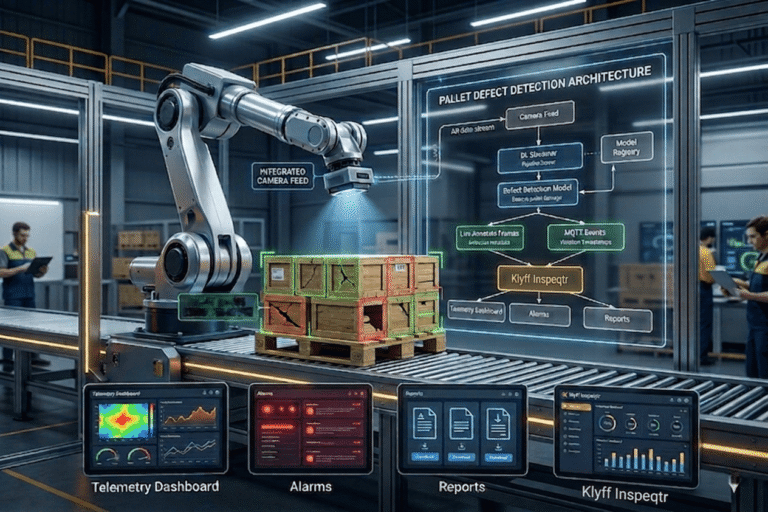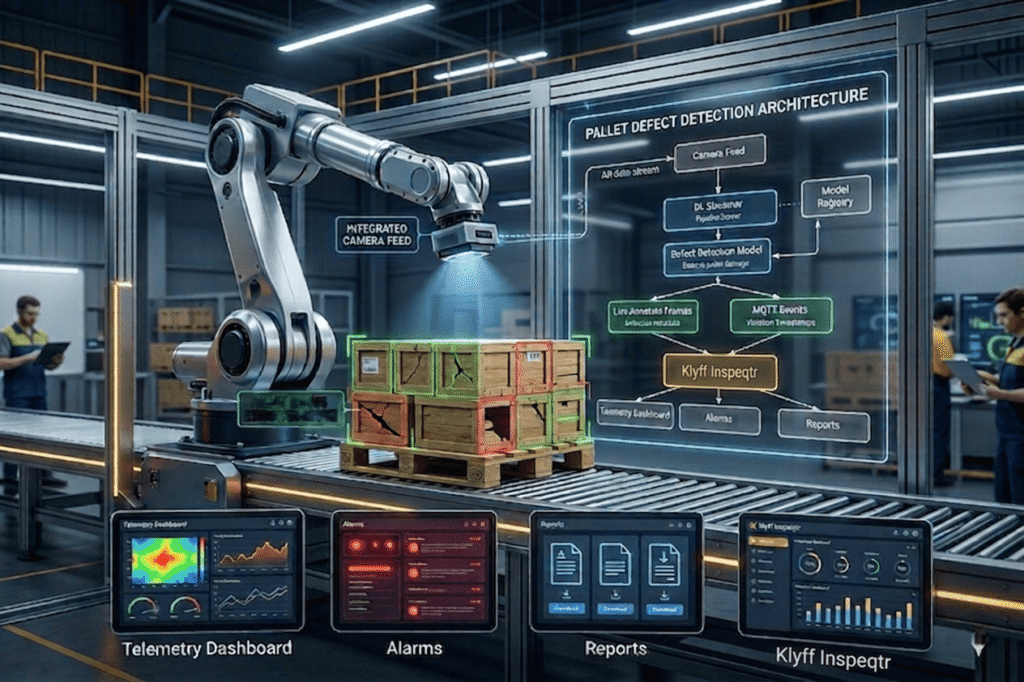
In modern manufacturing and logistics, Pallet Defect Detection plays a critical role in maintaining supply chain efficiency. Pallets are the backbone of material handling, but identifying faulty or damaged pallets manually is time-consuming. On average, a single pallet takes 10–15 seconds to inspect for defects, making the process inefficient at scale.
A single defective pallet can compromise an entire shipment, leading to product damage, costly delays, and regulatory compliance issues. In this blog, we will see a solution to overcome this problem.
We will build a real-time Pallet Defect Detection system running entirely at the edge. It tracks pallets, detects defects, and counts them accurately as they cross an inspection line. Defects trigger instant local alerts, while telemetry updates your dashboard in milliseconds—ensuring fast, reliable quality monitoring without cloud dependency.
Why Edge AI for Pallet Defect Detection
Cloud-based vision systems can look appealing, but in real manufacturing environments, they face practical limitations:
- Latency: Sending frames to the cloud and receiving results introduces delay. Even a typical round-trip of ~100–300 ms means several frames pass on a moving conveyor before a decision is made, making real-time rejection difficult.
- Bandwidth: Continuous video streaming from multiple cameras quickly adds up. A compressed 1080p stream typically uses a few Mbps per camera, and scaling to many cameras can strain factory networks.
- Privacy & Compliance: Streaming video outside the facility can expose sensitive operational data and may raise compliance concerns.
- Reliability: Cloud-based systems depend on stable connectivity. Network interruptions can delay or stop the inspection entirely.
How Edge AI Solves This
In our pallet defect detection system, DLStreamer runs on an edge device, performing inference locally. This addresses the above challenges:
- Independent operation: Since inference runs locally on the edge device, the system continues detecting defects even if network connectivity is lost.
- Low latency: Processing happens on-device, typically within ~10ms per frame, enabling real-time decisions on the production line.
- Efficient data transfer: Instead of sending full video streams, only structured metadata (such as defect type, counts, and timestamps) is sent over MQTT to the dashboard.
- Data stays local: Video processing remains within the facility. Video is only streamed locally (via RTSP/WebRTC) for visualization, not for cloud processing.
What Intel Edge AI Enables?
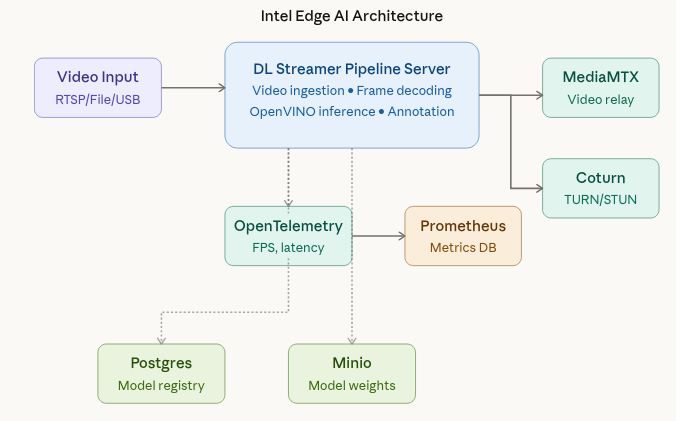
The Pallet Defect Detection sample uses a microservice-based architecture running on an industrial edge system. At the core is the DL Streamer Pipeline Server, which ingests video streams and executes the inference pipeline to detect pallets and identify defects. MediaMTX manages video streaming and enables real-time visualization through WebRTC, while Coturn provides reliable connectivity across network boundaries using TURN/STUN protocols.
For observability, OpenTelemetry Collector and Prometheus gather metrics, allowing operators to monitor system performance, pipeline health, and inference throughput. Postgres and MinIO support the model registry, ensuring persistent storage for models, configurations, and metadata used in pallet inspection workflows.
Together, these services provide a flexible and scalable platform. You can adjust pipeline parameters for defect detection accuracy, switch between video sources (camera or recorded footage), and maintain continuous monitoring without redesigning the overall system architecture.
From Camera to Decision
The system is designed to handle three types of input sources: file, RTSP, and webcam. Using a file source is useful for replaying predefined scenarios during testing or development. In real-world deployments, the same pipeline can easily switch to an RTSP stream from a fixed industrial camera or a USB webcam connected to the edge device. The key advantage is that the pipeline logic remains unchanged, so you can swap input sources without modifying the inference setup.
(1).png)
Once the pipeline is running, the DL Streamer Pipeline Server takes care of processing each frame, running the AI model, and adding visual overlays for detected defects. The processed output is then streamed to a browser using WebRTC, allowing users to view results in real time without needing any special client software. Instead of acting like a basic video stream, the system behaves as a continuously running service with observable performance and monitoring capabilities.
Technical Working (From Request to Result)
We can think of the Pallet Defect Detection system as a well-organized and observable processing flow.
The unique pipeline instance ID returned when starting the pipeline can be used later to check its status, update configurations, or stop the pipeline when needed.
The pipeline is initiated through a REST API call, where you can specify details such as the source (video input), destination (output stream), metadata, and other parameters.
The DL Streamer Pipeline Server connects to the input source, decodes incoming frames, and runs the defect detection model using the configured hardware (CPU/GPU).
Detected pallets and their defects are highlighted with visual overlays, and the processed video is streamed to a browser using WebRTC for real-time viewing.
The system continuously generates metrics like FPS, latency, and overall health, which are collected by the OpenTelemetry Collector and made available to Prometheus for monitoring.
OpenVINO Model Optimization & Deployment
OpenVINO offers a performance-tuned inference engine specifically designed for Intel hardware in edge AI scenarios. It takes models trained in popular frameworks like PyTorch, TensorFlow, or ONNX and converts them into an optimized Intermediate Representation (IR). This IR consists of two files: .xml for the model structure and .bin for the weights enabling highly efficient and fast execution on Intel devices.
Export and Convert a YOLO Model
# Step 1: Export YOLOv8 to ONNX
from ultralytics import YOLO

model = YOLO('yolov8n.pt')
model.export(format='openvino', imgsz=640)
# Ultralytics handles OVC conversion automatically!
INT8 Quantization
OpenVINO’s Post-Training Quantization (PTQ) reduces model precision from 32-bit floating point to 8-bit integers, which brings several practical benefits:
- Smaller Model Size: Lower precision reduces memory usage, making the model quicker to load and easier to store.
- Improved Performance: Inference becomes faster, especially when running on CPUs in modern Intel hardware.
- Negligible Accuracy Impact: With proper calibration using a representative dataset (around 100–500 images), the drop in accuracy is usually less than 1%.
To learn more about how to apply quantization and evaluate its effects, refer to the guide on Quantization in Edge AI.
OpenVINO IR models do not include preprocessing or output decoding logic. You must define a model_proc.json file to handle input preprocessing, output parsing, and label mapping.
{
  "json_schema_version": "2.2.0",
  "input_preproc": [
    {
      "layer_name": "image",
      "format": "image",
      "params": {
        "resize": "aspect-ratio",
        "color_space": "BGR",
        "mean": [123.675, 116.28, 103.53],
        "std": [58.395, 57.12, 57.375]
      }
    }
  ],
  "output_postproc": [
    {
      "converter": "boxes_labels",
      "confidence_threshold": 0.7,
      "labels": [
        "defect",
        "shipping_label",
        "box"
      ]
    }
  ]
}
Field Explanation:
- input_preproc: Controls how incoming frames are prepared before inference. Using aspect-ratio ensures the image is resized to the model’s required dimensions without distorting its original proportions.
- converter: Defines how the model’s output is processed. It applies techniques like Non-Maximum Suppression (NMS) and filters detections based on confidence scores.
- confidence_threshold: Filters out low-confidence predictions. Any detection with a confidence score below 0.7 is ignored to minimize false positives.
- labels: Provides readable class names that correspond to the numerical indices produced by the model.
IoT Platform Integration: From Inference to Action
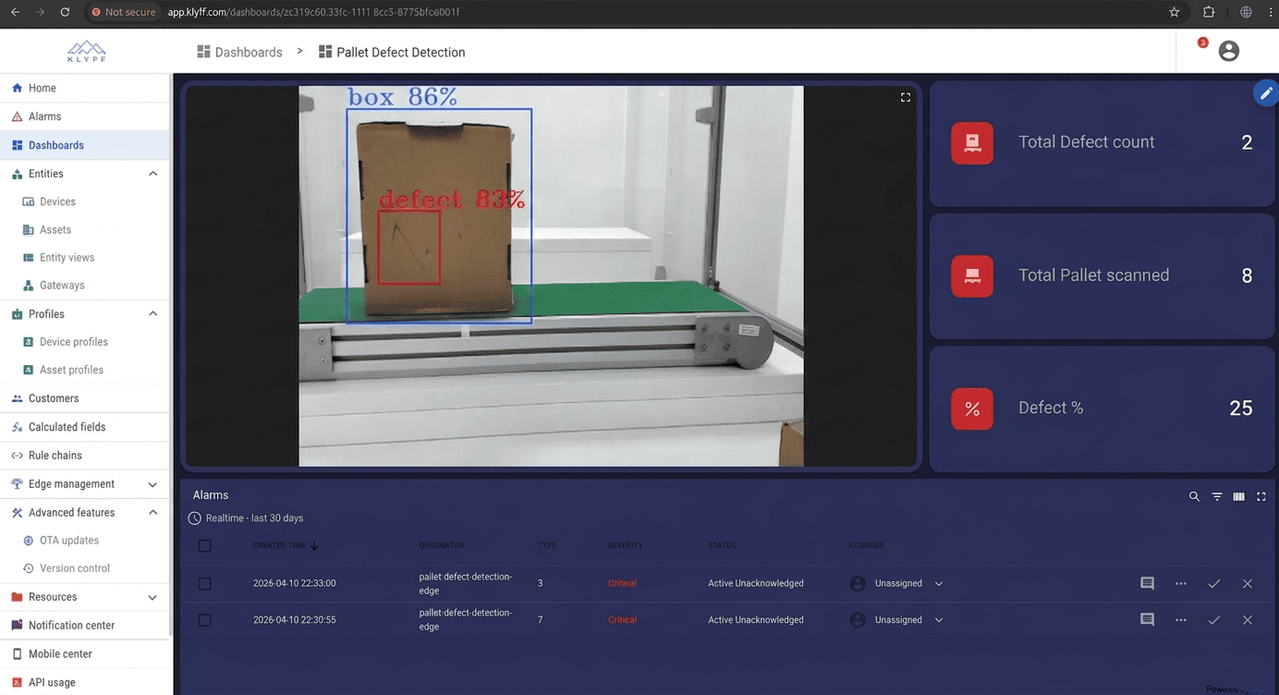
AI predictions only become useful when they are connected to real systems that can act on them. In the pallet defect detection setup, the detection results are sent to IoT platforms like Inspeqtr using MQTT, where they are converted from raw model outputs into clear, structured events that can be monitored and used for decision-making.
Klyff Inspeqtr Integration
A pallet defect detection system needs more than just identifying defects. It requires alerts, dashboards, historical tracking, live monitoring, and quick response from operators. To achieve this, a custom MQTT converter is used to process incoming detection data and transform it into a format compatible with platforms like Inspeqtr.
The converter reads the inference metadata, identifies defects, and maps them into structured telemetry, device attributes, and alert events linked to the specific inspection unit. Each detection is timestamped and enriched with relevant context for further processing and analysis.
This setup turns raw AI detection outputs into a dependable, real-time monitoring and alerting system, making it well-suited for industrial quality inspection workflows.
The Logic Behind Line Crossing Detection
Imagine you are standing next to a conveyor in a warehouse, counting how many pallets pass by and how many of them have defects. It sounds simple, but there’s a catch. The camera runs at a certain FPS; for example, at 30 FPS, it sees the same box 30 times in one second. Without proper handling, this would result in counting the same box 30 times. Here, you’ll gain insights into how to solve this problem.
Bounding Box:
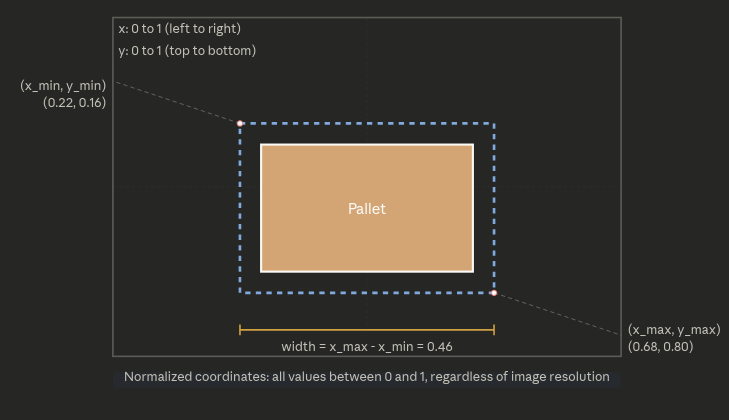
When computer vision detects a pallet, it draws a rectangle around it. This rectangle is called a bounding box, and mathematically it is defined by four numbers:
x_min, y_min = coordinates of the top-left corner
x_max, y_max = coordinates of the bottom-right corner
All four values are between 0 and 1 (normalized), where:
0.5 = middle of the screen
0 = left or top edge of the screen
1 = right or bottom edge of the screen
Later, I will use this to locate the center point of the bounding box so that I can keep track of it.
The IoU Score:
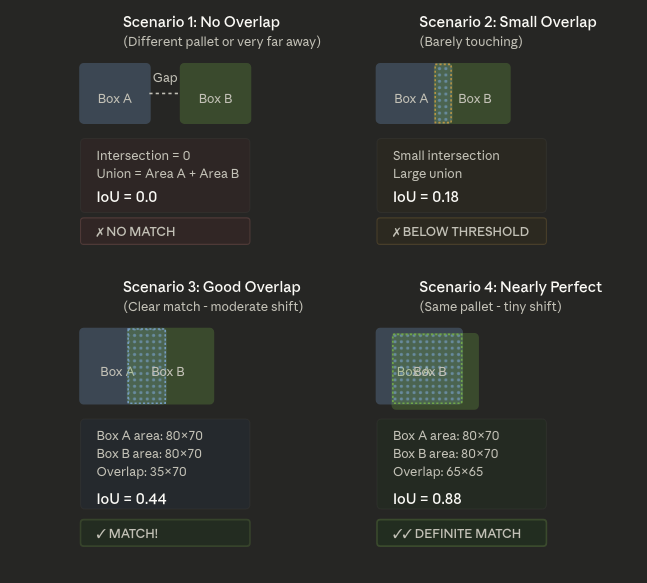
The camera sees a pallet in frame 1 and again in frame 2. How do we determine whether it is the same pallet or a different one? The system uses a metric called Intersection over Union (IoU) to answer this question.
An intersection is the area where two rectangles overlap.
The system calculates the union as the total combined area of both rectangles.
IoU = Intersection Area / Union Area
- If the IoU is 1.0, the rectangles are identical—meaning it’s the same pallet in the same position.
- If the IoU is around 0.5, the rectangles overlap partially, which usually means it’s the same pallet that has moved slightly between frames.
- If the IoU is 0.0, there’s no overlap at all, so it’s likely a completely different pallet.
In practice, we set a threshold (typically around 0.25). If the IoU is higher than this value, we treat it as the same pallet; otherwise, we consider it a new one.
Understand it using an example:
The Line crossing magic:
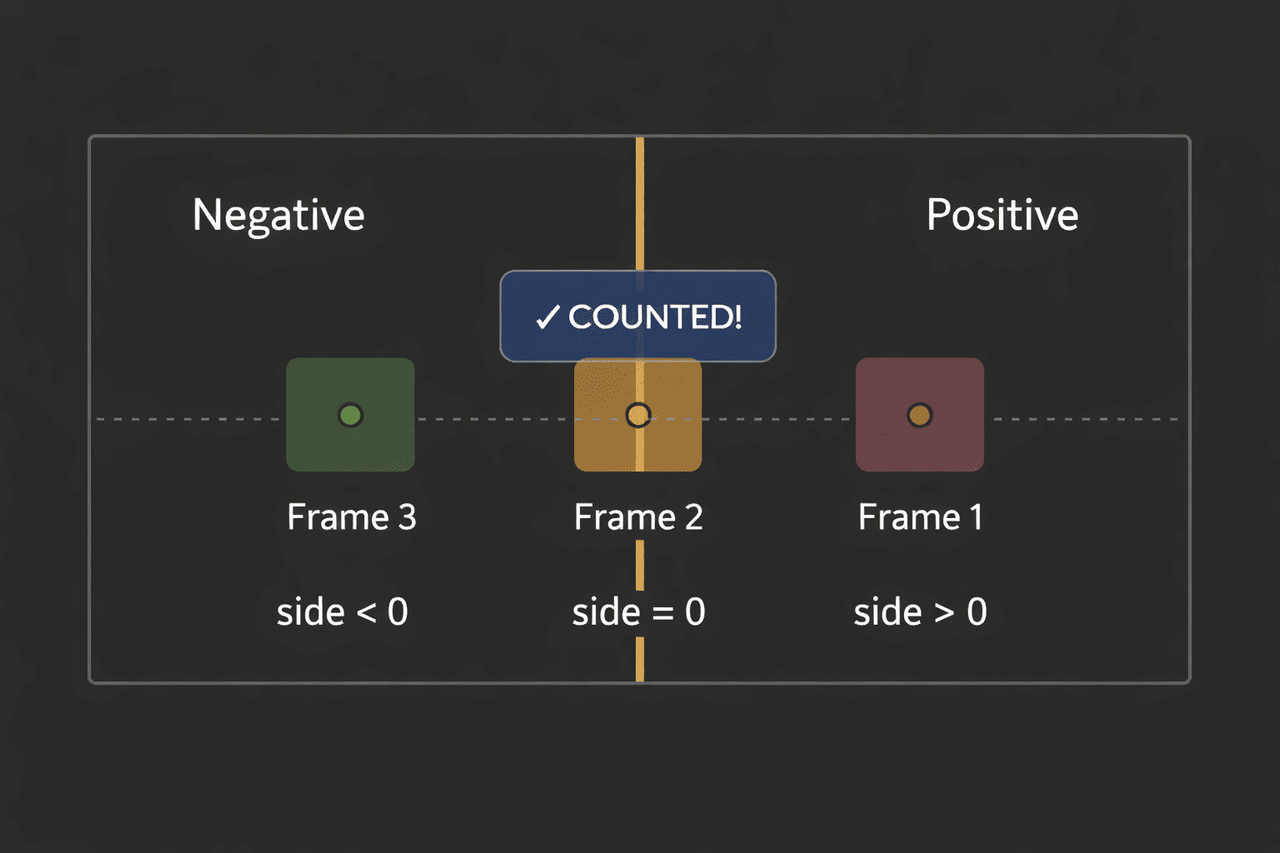
This is the core of the counting of boxes. The system draws an imaginary vertical line across the conveyor. When a pallet’s center point crosses this line, the system counts it as one pallet passing by.
But how does the computer know the center point crossed the line?
Using the cross product
The cross product measures how much two vectors “twist” relative to each other.
Positive Number = point is on the right side (before crossing)
Negative Number = point is on the left side ( after crossing)
Zero = point is on the virtual line.
side = (x2 - x1) × (py - y1) - (y2 - y1) × (px - x1)
Where: (x1,y1) = line start, (x2,y2) = line end, (px,py) = pallet center point
Simplification for Vertical Line at x = 0.5
x1 = 0.5, y1 = 0.0, x2 = 0.5, y2 = 1.0
side = (0.5-0.5) × (py-0.0) - (1.0-0.0) × (px-0.5)
side = 0 × (py) - 1 × (px-0.5)
side = -(px - 0.5)
Detecting the crossing
As the pallet moves on the other side of the frame, its center x coordinates decrease. If the point was on the right side of the line in frame 1 and on the left side in frame 2, then it crossed the line.
Tracking Objects Over Time
Now we know how to detect line crossings, but we still need to track which pallet is which. The system uses a lightweight tracking algorithm.
The Tracking Process
High-confidence detections first.
The system sorts detections by confidence score:
High confidence (≥0.6) = the AI is very sure this is a pallet
Low confidence (0.1 to 0.6) = the AI is less sure
First, it matches high-confidence detections to existing tracks using IoU.
Assign IDs: Each tracked pallet gets a unique ID (track_id). This ID stays with the pallet as long as it’s visible.
Age out lost tracks: If a pallet leaves the camera view, its track gets marked as “lost”. If it stays lost for too many frames (default 30 frames), the track is deleted.
Create new tracks: For high-confidence detections that don’t match any existing track, create a new track and assign a new ID.
Why This Matters
Because of this tracking:
- The same pallet always has the same ID
- We only count it once when it crosses the line
- We mark it as “counted,” so we don’t count it again
Detecting Defects
The system detects defects separately. If a pallet has a defect detection overlapping with it (IoU ≥ 0.25, confidence ≥ 0.5), the system marks that pallet’s track as defective.
When the pallet crosses the line:
- If it’s a normal pallet, increase the box count
- If it’s a defective pallet, then increase the box count and defective box count
You can find the complete source code on GitHub: https://github.com/KlyffHanger/Inspeqtr-PalletDefect
Conclusion
Pallet defect detection is a critical use case in manufacturing and logistics, where ensuring product quality and preventing downstream issues are essential. The Intel Open Edge platform, combined with Klyff Inspeqtr, as demonstrated by the Pallet Defect Detection sample, shows how you can move quality inspection to the edge efficiently while maintaining strong observability and flexibility. This approach enables a system that ingests video from production lines, detects pallet defects in real time, streams annotated results to a browser, and adapts to changing operational conditions—delivering reliable and scalable inspection for industrial environments.
Get in touch with us for us to help you with your Automated Quality Inspection scenarios. We are just a message away.